A video generation model gives you one clip, somewhere between 8 and 30 seconds long. An ad, a music video or a short film runs longer than that, and it needs the same character, the same world and the same light from the first second to the last. So how do you make a longer video with a model that only makes short ones?
You make it the way films have always been made: as a list of short shots, cut together. The craft is in keeping those shots consistent. This post covers which models exist, how well they perform, and the workflow that turns their clips into one video.
The three ads above were made with the workflow in this post, entirely through a video API.
Which models are there
Video models split into two groups. Closed models run only on their maker's servers and on resellers. Open-weights models can be downloaded, so independent hosts can run them and you can run them yourself.
| Model | Maker | Weights | Longest clip | Top resolution |
|---|---|---|---|---|
| Wan 3.0 | Alibaba | Closed | 30 s | 1080p |
| Seedance 2.5 | ByteDance | Closed | 30 s | 1080p, with a 4K tier |
| Kling 4.0 | Kling AI (Kuaishou) | Closed | 30 s | 1080p |
| Veo 3.1 | Closed | 8 s | 4K | |
| Runway Gen-4.5 | Runway | Closed | 10 s | 720p |
| MiniMax H3 | MiniMax | Open* | 15 s | 768p |
| LTX-2.5 | Lightricks | Open* | 20 s | 4K |
* Open weights come with a licence, and the licence can depend on where you are. The MiniMax H3 community licence does not cover use in the United States, the European Union, the United Kingdom or South Korea without a separate authorisation from MiniMax. The LTX-2.5 licence is free for commercial use up to $10 million of annual revenue. Read the licence before you download a model and run it yourself, or leave that part to an inference provider that holds the authorisation.
All seven generate sound with the picture: speech, music and effects. The famous Sora 2 from OpenAI is gone from the list. Its models and video API were shut down on 24 September 2026.
How well do they perform
The most used public measure is the Artificial Analysis video arena, where people pick the better of two clips without knowing which model made them. The result is an Elo score per model. On 19 November 2026 the text to video board for clips with sound read:
| Rank | Model | Elo | Weights |
|---|---|---|---|
| 1 | Wan 3.0 | 1174 | Closed |
| 2 | Utopai X | 1168 | Closed |
| 3 | MiniMax H3 | 1159 | Open |
| 4 | Seedance 2.5 | 1156 | Closed |
| 5 | Hyperflow H3 | 1154 | Open |
The top five sit within 20 points of each other, which is inside the margin of error of the measurement. Further down, Veo 3.1 scores 963 and LTX-2.5 Fast 939. On the image to video board Seedance 2.5 leads with 1161 and MiniMax H3 is the best open-weights model at 1134.
Two conclusions follow. The best open-weights model now plays in the same league as the best closed ones. And at the top, the ranking no longer decides which model to use.
A single score also hides how uneven the models are. Performance varies by domain: one model is strongest at fast motion, another at animation and stylised looks, another at realistic footage of people. The ranking averages all of that. Try two or three models on a shot from your own project and see which one works for what you make.
For a longer video, three other things decide:
- Reference inputs. A model that accepts reference images, a first frame and a last frame can carry a character from shot to shot. A text-only model cannot.
- Clip length. Between 8 and 30 seconds in a single generation. In practice it matters less than it looks, because a watchable video changes shot every 2 to 4 seconds.
- Price per take. You will generate every shot several times, until you are happy with it, so the price of one second of video multiplies quickly.
The examples in this post use MiniMax H3, which we serve on anex.sh in four forms. Seedance 2.5 is in the table for comparison, at ByteDance's own list price:
| Model | What it does | Price per second of video |
|---|---|---|
| MiniMax H3 (50 steps) | Text to video, first and last frame | $0.068 |
| MiniMax H3 Ref2VA (50 steps) | Up to 9 reference images, reference audio, or a video to edit | $0.068 |
| MiniMax H3 Ref2VA (4-step) | The same reference inputs, rendered about ten times sooner | $0.051 |
| FastH3-8-Step-V2 | Text to video in 8 steps | $0.017 |
| Seedance 2.5 | Text, images, video and audio as input, clips up to 30 seconds | about $0.23 at 720p, $0.57 at 1080p |
| Seedance 2.5 Flash | The faster, cheaper Seedance, up to 720p | about $0.15 at 720p |
Seedance costs much more: three to eight times the price of MiniMax H3 per second, by BytePlus's price list on 19 November 2026. For some work it is worth it. It leads the image to video ranking, it makes 30 seconds in one take, and it renders at 1080p without an upscale step. A sensible split is to pay for it on the shots that carry the video, and to run the many takes of everything else on a cheaper model.
The workflow carries over to any model with reference inputs.
Specialised models around the main one
The models in the tables are the general ones. Around each of them sits a set of specialised models, and a working pipeline uses several.
Distilled and quantized versions, for quick and cheap drafts. A video model does not draw a clip in one go. It starts from random noise and removes a little of it at a time, each pass guided by your prompt, until a picture is left. One such pass is a diffusion step. Every step costs about the same compute, so the time to make a clip grows with the number of steps. A full model takes about 50 of them. A distilled version is trained to reach a similar picture in 4 to 8 steps, so it finishes several times sooner and costs a fraction. FastH3-8-Step-V2 is MiniMax H3 distilled to 8 steps, at a quarter of the price. The 4-step Ref2VA does the same for reference requests. LTX-2.5 ships its own distilled variant. Quantization is the other lever: the weights are stored at lower precision (FP8, 8-bit floating point), which makes the model fit on smaller graphics cards. Use these versions to test ideas and prompts, and expect the full model to frame the final take a little differently.
Upscaling models. Generating at high resolution is slow and expensive, so the usual route is to generate at 720p or 768p, pick the take, and upscale only that one. An upscaling model such as SeedVR2 takes a finished clip and returns it at 2K or 4K with the detail filled in. On anex.sh that is the upscale step: $0.0425 per second to 2K and $0.068 to 4K.
Models for one editing job. Some models do a single task on existing footage. Reference and editing models such as MiniMax H3 Ref2VA put a given person, product or place into a new clip, or change objects in a clip you supply. Wan-Animate replaces a character in a video with another one and keeps the original motion and expressions. Runway's Aleph edits existing video from a text instruction. Others relight a scene, dub it into another language, or extend a clip past its end.
It sounds like a lot of models and terms at once. It sorts itself out quickly once you are hands on: after your first few clips you will know which model to reach for.
A longer video is a list of shots
Five steps take you from an idea to a finished video:
- Script. One line per shot: setting, action, sound, length.
- Character sheet. Still images of the character from the front, the side and the back, made with an image model.
- Keyframe. For each shot, one still image of its opening frame, made from the sheet.
- Clip. The keyframe goes in as the first frame of a video clip. Several takes per shot.
- Edit. Trim, order, crossfade, level the sound.
Steps 2 and 3 are where consistency comes from. The video model never has to invent the character. It only has to move it.
There is another way to do it. Charlie Automates, in his Higgsfield guide, chains his shots: the last frame of one scene becomes the reference for the opening image of the next, and four 10-second scenes make 40 seconds. Neighbouring scenes flow into each other that way. The price is that the shots depend on one another, so redoing one means redoing every shot after it. With a character sheet every shot starts from the same source, so shots can be generated in parallel, redone one at a time and reordered in the edit. Chaining suits one continuous scene. A sheet suits a video made of many short cuts.
Start with a character sheet
A character sheet is a small set of still images that fixes what a character looks like before any video exists. Animation studios have used them for a century, because many hands have to draw the same face. Many generations of a model have the same problem.
A sheet that works as a reference has:
- Three views: front, side and back, full body. Add a close-up of the face if the video has close-ups.
- A plain background and even light. Anything behind the character can leak into your scenes.
- One outfit and one set of props. If the character changes clothes in the story, make a second sheet.
- Views generated together with an image model such as Nano Banana 2, in one picture or one session, so they agree with each other. Then crop them into separate files.
- Small files. A JPEG of a few hundred kilobytes carries everything the video model uses.

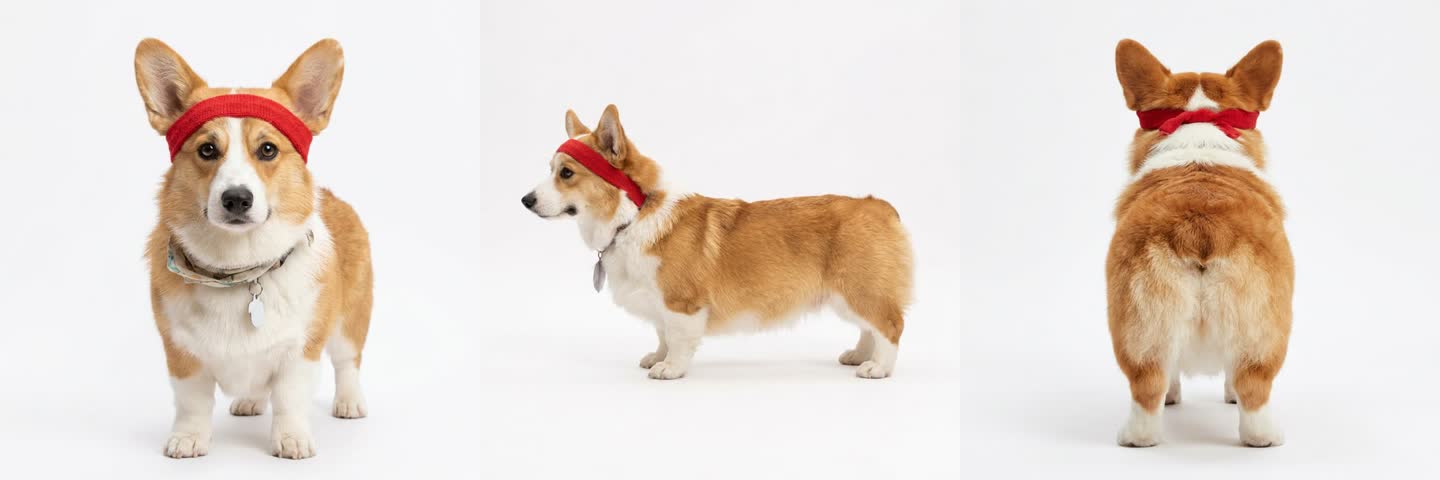
Make one sheet per character, one per recurring object (a branded cup, a vehicle) and one per location you return to. MiniMax H3 Ref2VA takes up to 9 images in a request, and the first 5 are included in the price.
The most famous sheet of all. Bugs Bunny looks the way he does because of one. Animator Robert McKimson drew a model sheet of the rabbit in October 1942 and revised it in 1943. The revised sheet "cemented Bugs' definitive look", and the directors at Warner Bros. adopted it. Both sheets are reproduced at Cartoon Research. A sheet for a video model does the same job for the same reason.
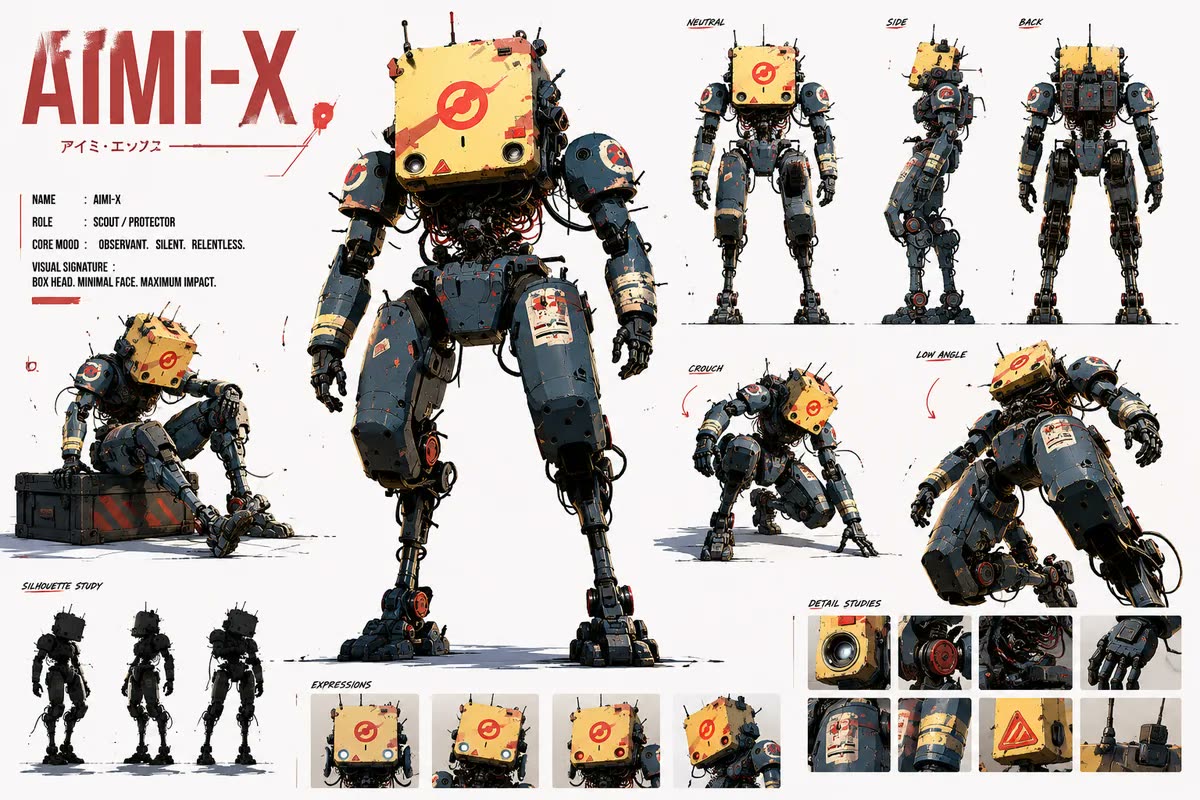
What a sheet looks like today. Kōda (@aimikoda) makes AI short films and publishes the workflow behind them: characters in Midjourney, character sheets from those images, storyboards from the sheets, then video with the storyboard and the sheets as references. Kōda released about 150 of those sheets for anyone to use. This one, Aimi-X, carries everything a model needs to hold a character: name and role, neutral, side and back views, two action poses, a silhouette study, expressions and close-ups of the details.
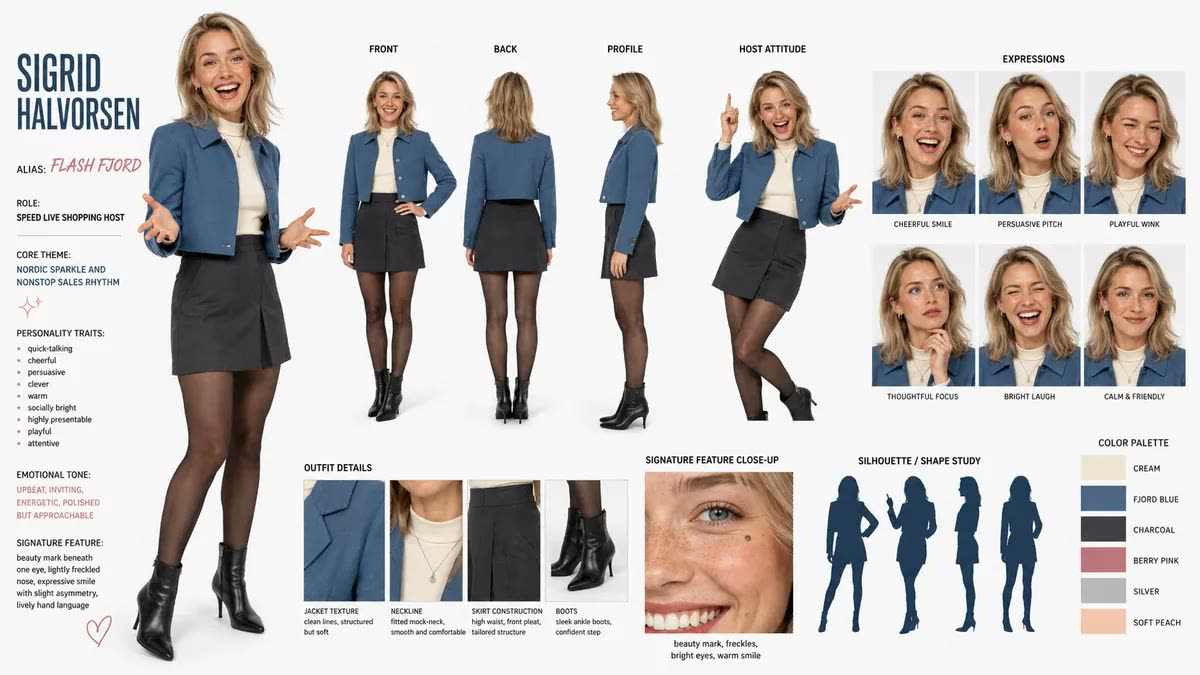
A sheet for a human persona puts the face first. This one, from the same collection, is a presenter character: Sigrid Halvorsen, a live shopping host. A third of the sheet is face. It has six expressions, each with a name, and a close-up of the features that make her recognisable: a beauty mark under one eye, freckles, the smile. Around that sit the front, back and profile views, one pose in character, close-ups of the outfit, a silhouette study and a colour palette. The written notes (role, personality, emotional tone) go into every shot prompt alongside the picture.
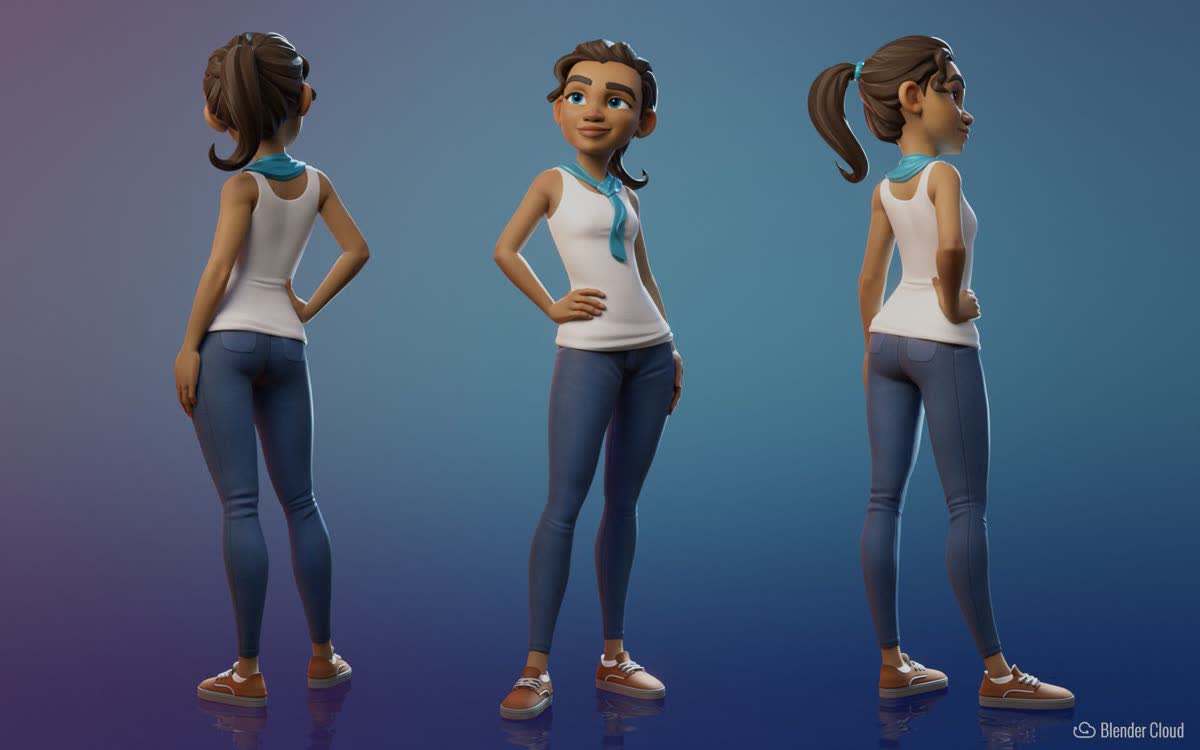
A studio example you can study freely. Blender Studio releases its characters under an open licence. This is its turnaround of Rain: the same character from the back, the front and the side, in one neutral pose, with flat light and an empty background. Swap the 3D render for an image model and it is exactly the sheet a video model wants.
Sheets from published productions. Flick published the character sheets and prompts behind five short films from its summer 2026 residency. They show how working filmmakers build theirs:
- The Perfect Proposal (Zhelun "Jerry" Lin): front, left side and back of each character in one image, on plain grey. One sheet, a translucent blue ghost, is referenced in 66 shots.
- Lifeguard (Owen Doerr): four views plus a large headshot on pure white. The prompt pins the clothing to exact colour codes and excludes props.
- Still Time (Marius Jensen): seven views per character, four full-body and three close-ups.
- Catch Out (Dr. Dreams): front, left and right views with the labels written on the sheet, for people and for a dog. A character who shaves his head mid-story gets a second sheet.
- Mila & Sasa (Katrin Ann Orbeta): a 2D character in four full-body views, with a prompt that asks to keep "the minimalist design, the eyes, her colours, the type of line, and shadows".
The pattern is the same everywhere: three to seven views, a plain background, one sheet per look, and the same sheet attached to every shot the character appears in.
There are three ways to hand the sheet to the video model:
| Route | How | Use it when |
|---|---|---|
| Reference images | Send the sheet with the prompt to the reference model | The shot is simple and the character matters more than the framing |
| Keyframe | Make a still of the shot's first frame from the sheet and send it as the first frame | You need exact framing, text in the picture, or the cleanest image |
| First and last frame | Make two stills and let the model move between them | The shot has to end in a set position, for example to match the next cut |
What the models do with your references
Reference images hold the character and ignore your style. A photoreal capybara on the sheet stays photoreal in the clip, even when the prompt asks for clay, felt or film noir. Put the style into the sheet, or grade the footage in the edit.
The background of a reference leaks. When the new setting resembles the reference picture (a window, a cafe), the clip stays in the reference scene. Open the prompt with a strong, distant setting and name what must be absent ("no cafe, no windows").
A full-body sheet moves the camera outside. With a full-body character as reference, a shot written as a first-person view comes back in third person, looking at the character. For a point-of-view shot, give the model a point-of-view frame.
Text and logos belong in the keyframe. This is the most useful trick in the whole workflow. A video model writes text unreliably, and you only find out after the whole clip has rendered. An image model writes the word correctly, and you can check it at a glance. So the text goes into a still image first, and the video model only has to keep it there while things move.
That is how the anex.sh wordmark got into the ads above. For the kart shot, the steps were:
- Make the keyframe with an image model. The character sheet goes in as reference, and the prompt describes the surface that carries the text: what it is, its exact colour, the exact wordmark, the typeface, and that nothing else may be written anywhere.
- Check the still. If a letter is wrong, generate the image again. A still is quicker to make and to judge than a clip.
- Resize it to the clip's size (1344x768 for 16:9).
- Send it as the first frame to the full MiniMax H3 model, with a prompt that describes only the motion and the sound. The banner is already part of the picture, so the model treats it like any other object in the scene.

The image prompt that made it:
Screenshot of a late-1990s low-poly 3D racing video game: chunky polygons, simple blocky textures, bright blue sky, a grey race track with red-and-white kerbs. In the middle of the track the capybara from the reference images (same brown fur, same bright yellow hooded raincoat, holding the same brown paper coffee cup) rides fast in a metal shopping cart toward the camera. Over the track hangs a big orange (#C2410C) start/finish banner with the white lowercase wordmark anex.sh in a heavy geometric sans-serif, large, sharp and perfectly legible. Blocky cars behind. No other text, no other logos, no game interface.
The same keyframe also solves the style problem from above. The sheet shows a photoreal capybara, and the image model redraws it as a 1990s video game without losing the raincoat or the cup. For a place that returns in several shots, such as the branded diving platform in the corgi ad, make the still once and reuse it as a location sheet.
Words in the prompt end up on walls. A line of dialogue in quotes, in a shot that has a sign in frame, gets painted onto the sign: a kart-race banner that reads "OUT OF MY WAY!". Leave quotes out when any surface can carry text. A single word can drag a whole logo in. "Olympic" paints rings on every scoreboard, and "international championship, no logos, no rings, no text" does the job.
A talking mouth cannot be dubbed. Laying new speech under a shot whose mouth forms other words reads as bad dubbing. If the sound is wrong, generate the shot again with the sound described in the prompt. Swapping ambience and music between takes works fine.
Editing a clip changes content, and leaves style alone. Sending a finished clip back with a prompt changes objects and details well. It does not change the whole look.
The cut hides a lot. Crossfades of 0.2 seconds, and tails 0.2 seconds longer than the cut point, make separate clips feel continuous.
Write the prompt like a shot description
A short prompt leaves the model to decide everything you did not say, and it decides differently on every take. The prompts that work read like a page from a shooting script.
For a showcase of physics scenes made with MiniMax H3 (ink in water, a hydraulic press, a Tesla coil, a dam breach) we wrote 15 prompts. Their picture descriptions run from 114 to 614 words, with a median of 195. Each has a separate sound line of 14 to 46 words. The clips are 5 to 9 seconds long, so that is roughly 30 words of description per second of video.
What those words are spent on:
- Camera and light. Shot size, angle, movement, depth of field, the colour and direction of each light.
- The order of events, with timing. "Within the first second the box fans switch on", "by the middle of the shot", "for the whole second half".
- What must stay out. "No crayon snaps, shatters or splinters", "it never touches the dish", "nothing arcs from the lower half of the machine".
- Where things sit in the frame. "Its tip stays inside the picture", or which side of the frame an arrow enters from.
- Materials and how they behave. Soft wax under a press has to shorten and bulge, "squashing down like stiff clay".
- Sound, on its own line. Every source named, in the order you hear it.
One of the shorter ones, in full (131 words for 5 seconds):
In a huge pitch-dark hangar, a towering Tesla coil stands on a concrete floor: a tall slender column wound with gleaming copper wire, crowned by a large polished metal toroid. All of the electricity is at the top. Violent branching purple-white lightning arcs burst only from the outer edge of the toroid, forking outward and upward through the air, and the longest of them reach across to the tip of a tall grounded metal rod standing a few meters away. The copper column, the base of the coil and the floor around it stay dark and completely free of sparks; nothing arcs from the lower half of the machine. Each discharge lights up drifting haze high in the hangar. Static low-angle wide shot looking up at the crackling crown of plasma.
Sound: Loud harsh buzzing and snapping of electrical arcs, deep crackling pops echoing in a large hangar, and a steady electrical hum.
The longest prompts belong to the scenes with the most moving parts. The bridge collapse takes 614 words.
All 15 prompts, five of them with the resulting clip
Fluid Dynamics: Ink in water (9 s, 114 words)
Extreme slow-motion macro cinematography inside a crystal-clear glass tank of water against a deep black background. From the very first frame the screen is already filled edge to edge with an enormous mid-bloom explosion of ink: towering billowing clouds of ultramarine blue, hot magenta and molten gold collide in the center of the frame, glowing vividly in soft white backlight. The clouds keep unfurling into mushroom shapes whose edges curl into delicate vortex rings and fine filaments that fold and intertwine, while fresh plumes of ink plunge down from the top of the frame and tiny air bubbles rise. The camera drifts slowly forward into the swirling clouds with very shallow depth of field.
Sound: A deep muffled underwater hum, soft liquid whooshes and faint bubbling as the ink plunges into the water.
Compression: Hydraulic press (7 s, 168 words)
In a dark industrial workshop lit by a warm spotlight and a cool blue rim light, six thick wax crayons stand upright side by side in a tight row on a thick steel plate: red, orange, yellow, green, blue and purple, each a plain smooth wax cylinder with a flat blunt top and no paper wrapper. A massive polished steel hydraulic press piston descends slowly and steadily onto them. The wax is soft, so no crayon snaps, shatters or splinters: under the pressure all six crayons shorten and bulge outward at the same time, squashing down like stiff clay. Each crayon keeps its own color and the colors stay separate, side by side, as the soft wax spreads out from under the piston in thick rounded folds. The piston stops just above the plate, leaving one flat striped slab of red, orange, yellow, green, blue and purple wax. Static close-up at table height in slow motion with shallow depth of field, fine dust hanging in the light beam.
Sound: A low hydraulic motor whine, a soft creaking and squelching of wax being squeezed, and a heavy metallic groan as the piston stops.
Inertia: Water balloon burst (5 s, 284 words)
Ultra slow-motion high-speed camera footage against a pure black studio background with strong white backlight. One single round red water balloon, swollen with clear water, hangs by its knot from a thin string in the center of the frame. A slim arrow flies in fast from the right, travelling point first toward the left: its sharp steel arrowhead is at the front, leading end of the shaft and is the first part of the arrow to enter the frame, and its feathered fletching is at the rear end of the shaft, trailing behind, the last part to enter the frame. The arrowhead strikes the right side of the balloon first and pierces it, and the arrow passes straight through, arrowhead first, shooting out of the left side of the balloon and on out of the left edge of the frame, its feathers passing through last. The instant the arrow strikes, the stretched rubber splits and peels back off the water, shrivelling into a small limp wrinkled red scrap that stays hanging from the knot. At that same instant the water is disturbed: it does not stay a smooth glassy ball. Its whole surface turns rough at once, covered in sharp ripples, dimples and a mist of fine spray, a crown of droplets bursts out where the arrow went in, and a long tongue of water is dragged out of the left side along the arrow's path, stretching into a horizontal jet that breaks into droplets. The rough, ragged mass of water then falls straight down as one body, stretching and breaking into ribbons and droplets as it drops out through the bottom of the frame. Static locked-off close-up, every droplet sparkling in the backlight.
Sound: A sharp whip of an arrow and a rubbery snap stretched out in slow motion, a wet tearing splash, then a heavy fall of water below.
Magnetism: Ferrofluid (5 s, 237 words)
Static macro shot of a pool of glossy jet-black ferrofluid lying flat and still in a shallow glass dish on a dark reflective surface, lit by teal and amber studio lights. A polished cylindrical steel-grey magnet, held upright, is lowered slowly from the top of the frame toward the middle of the pool; it never touches the dish or dips into the liquid, and it always stays well above the rim of the dish. The magnetic field reaches the liquid long before the magnet does: right at the start of the shot, while the magnet is still high above the dish near the top of the frame, the surface directly below it already starts to stir, swells into a mound and breaks into dozens of tall, sharp, needle-like spikes, a dense bristling crown like a black sea urchin. The closer the magnet comes, the taller, sharper and more numerous the spikes grow. They follow the magnetic field: the spikes in the middle point straight up at the magnet and the outer ones lean outward in a fan. When the magnet stops a finger's width above the tips, the spiky mass stretches upward, leaps the gap and clings to the underside of the magnet, climbing its sides as a glossy black coat covered in sharp spikes that point straight out from the magnet. The spikes are crisp, regular and evenly spaced. Low camera angle, shallow depth of field.
Sound: Quiet laboratory room tone, a soft wet bristling as the spikes rise, a slurp as the liquid jumps to the magnet, and a faint low hum.
Heat Transfer: Red-hot ball on ice (7 s, 209 words)
In a dark studio, a red-hot steel ball glowing bright orange is set down by steel tongs on the flat top of a large crystal-clear block of ice lit from below with cold blue light. The tongs let go and withdraw. With a burst of white steam the ball starts to melt its way into the ice. While it is still near the surface, the meltwater it makes spreads across the top of the block, spills over the edges all the way around and trickles down every side of the block in thin glistening streams. The ball sinks straight down, leaving a narrow round shaft above it, and as it sinks it gives up its heat to the ice: its glow fades steadily from bright orange to dull cherry red and finally to dark grey metal, the steam thins to a few wisps, and the ball sinks more and more slowly until it comes to rest deep inside the block, cold and dark. The ice underneath the ball stays solid and untouched. Once the ball is deep inside, no more water comes out of the hole; the trickles on the sides thin out to slow drips. Slow push-in close-up at eye level with the block, shallow depth of field.
Sound: A fierce hiss and sizzle of steam that steadily weakens, crackling ice, water trickling and dripping, then near silence with a few last drips.
Chemical Reaction: Elephant toothpaste (5 s, 167 words)
On a spotlit black stage, a large, wide glass graduated cylinder, half full of clear liquid, stands in a broad shallow tray on a glossy black table. A gloved hand tips a small beaker of liquid into the cylinder and withdraws. An instant later the reaction takes off: dense foam surges up through the cylinder and bursts out of the top in a fast, powerful, thick column that shoots straight up to twice the height of the cylinder, striped in vivid pink, blue and yellow. Then the reaction quickly loses its strength: the column stops climbing, sags and topples over, and the foam only keeps welling out of the rim at a slower and slower pace, sliding down the outside of the glass in fat ropes that pile up in the tray, until it is just a lazy ooze. The cylinder stays standing the whole time, and wisps of steam rise from the warm foam. Wide low-angle static shot with dramatic backlight that makes the foam glow.
Sound: A sudden loud rushing whoosh of erupting foam that quickly dies down to a soft fizz and wet plopping as foam lands in the tray.
Chain Reaction: Domino cascade (7 s, 153 words)
In a vast dark hall with a polished black floor, one single line of large glossy dominoes stands upright, evenly spaced, running in one long gentle curve from the foreground away into the distance, its colors shifting along the line from gold to crimson to electric blue. It is the only line of dominoes in the hall; the rest of the floor is empty and dark. The chain reaction is running at a constant speed and never pauses: behind the toppling front every tile already lies fallen flat, overlapping the next one, and at the front each standing tile tips forward and knocks down its neighbor in perfect sequence, while the tiles ahead of the front stand upright and perfectly still until they are struck. The camera glides low beside the line at domino height, tracking smoothly alongside the toppling front, with shallow depth of field and warm spotlights gleaming on the tiles.
Sound: A rapid, perfectly steady rattling cascade of clicking tiles echoing in a large hall.
Resonance: Sound shatters glass (5 s, 188 words)
High-speed camera footage in extreme slow motion: a thin crystal wine glass stands on a black pedestal directly in front of a large studio loudspeaker cone, lit by a single hard white spotlight against darkness. Driven by the sound, the whole bowl of the glass vibrates as one smooth shape: seen from the side, the bowl grows slightly wider, then slightly narrower, then wider again, in a fast steady rhythm, both sides moving outward and inward together in perfect mirror symmetry, as its round rim is squeezed into an oval one way and then the other. The rim always stays level and horizontal; it never tilts, slants or rocks, and the glass never leans. The stem and foot stay perfectly still, and there are no ripples or jelly-like wobbles on the surface. The flexing grows larger with every cycle until a crack shoots down from the rim and the bowl breaks apart into several large curved shards and many small sharp fragments that fly outward and fall, leaving the stem and foot standing on the pedestal. Static close-up with shallow depth of field, the shards catching the light.
Sound: A pure sustained tone ringing through the glass and growing louder, then a sharp bright crack and tinkling fragments falling.
Electricity: Tesla coil (5 s, 131 words)
In a huge pitch-dark hangar, a towering Tesla coil stands on a concrete floor: a tall slender column wound with gleaming copper wire, crowned by a large polished metal toroid. All of the electricity is at the top. Violent branching purple-white lightning arcs burst only from the outer edge of the toroid, forking outward and upward through the air, and the longest of them reach across to the tip of a tall grounded metal rod standing a few meters away. The copper column, the base of the coil and the floor around it stay dark and completely free of sparks; nothing arcs from the lower half of the machine. Each discharge lights up drifting haze high in the hangar. Static low-angle wide shot looking up at the crackling crown of plasma.
Sound: Loud harsh buzzing and snapping of electrical arcs, deep crackling pops echoing in a large hangar, and a steady electrical hum.
Brittle Fracture: Steel ball through glass (5 s, 383 words)
High-speed camera footage in a dark studio, slowed down only moderately, so that the whole event fits into the shot, from the impact until the last piece has landed. One single large square pane of clear window glass stands upright in a black steel frame, seen from the side at an angle so that the space in front of the pane is on the left and the space behind it is on the right, lit from behind by warm golden light. Right at the start of the shot a polished steel ball flies in from the left and strikes the middle of the pane. From the exact point of impact, straight cracks race outward in every direction like the spokes of a wheel, all the way to the edges and the four corners, crossed by a few circular ring cracks, and the ball punches through and keeps flying to the right. The broken glass follows the ball: the whole pane bursts outward on the far side, to the right, in the direction the ball is travelling. A cone of glittering fragments streams after the ball, and the long dagger-shaped shards are pushed out of the frame toward the right, tipping away from the impact and falling in a wide scatter on the floor behind the pane. Nothing falls back toward the left, the side the ball came from. The pane does not stay in its frame: a moment after the impact the entire sheet has let go, from the centre out to the edges and all four corners, and every shard either flies off to the right or drops straight down out of the frame onto the floor. No piece stays stuck in the steel frame and nothing is left hanging in mid-air. By the middle of the shot there is no glass left in the frame, and for the whole second half of the shot the black steel frame stands completely empty, a bare open rectangle with only the golden light showing through it, while the last small fragments skitter to rest on the floor behind it. Every shard is perfectly rigid: the pieces never bend, stretch or warp, they only tilt, tumble and fly as stiff flat plates. Static camera with shallow depth of field, glass dust sparkling in the backlight.
Sound: A sharp crack of a steel ball hitting glass, a bright crash, then a long shower of tinkling shards hitting a concrete floor.
Momentum: Wrecking ball (5 s, 195 words)
At dusk on a demolition site lit by powerful floodlights, seen from the side, a huge black steel wrecking ball on a heavy chain swings in a long arc from the left side of the frame and slams into the middle of a tall free-standing red brick wall. Before the impact the wall is a complete, perfect rectangle of neat brickwork standing alone on flat, swept, empty ground. The ball hands its momentum over to the wall: at the moment of impact the ball comes almost to a dead stop against the bricks and is left hanging on its chain where it struck, barely swaying, while the wall takes over the movement. The struck section of the wall is driven onward to the right, in the direction the ball was travelling: the bricks burst out of the far side and fly on through the air, and the whole upper part of the wall tips over and topples away to the right, crashing down onto the empty ground in a thick cloud of mortar dust. Static wide low-angle shot in slow motion, the dust glowing in the backlight of the floodlights against a deep blue sky.
Sound: A heavy chain creaking and a deep whoosh, then a massive dull crunching impact, bricks cracking, clattering and thudding onto the ground, and a low rumble as the wall comes down.
Tension: Bridge collapse (7 s, 614 words)
Wide cinematic aerial shot of an old abandoned steel suspension bridge spanning a deep misty river gorge at sunrise, empty of vehicles and people. Two thick main cables sweep in long curves from one stone tower to the other, and thin vertical suspender cables hang down from them to hold up the long concrete road deck. At the start the bridge is whole and tidy, with nothing hanging beneath the deck, and the river far below is smooth and calm. Then, at the exact center of the span, midway between the two towers, the two main cables part with a sharp jolt, and the whole road deck comes down, starting at the center. The deck does not crumble into rubble: it tears apart crosswise into about ten huge, heavy sections of roadway, each as wide as the whole road and roughly as long as several trucks, of uneven, different lengths, with the steel girders still underneath. Nothing is cut cleanly and no section is a neat rectangle: the breaks run diagonally and in zigzags across the roadway, so every section has slanted, saw-toothed, irregular ends, some with a whole corner broken off or a large bite missing from one side, and the sections differ a lot in size, from short stubs to long spans. Every break is a ragged, jagged tear, with splintered, broken concrete, bent and twisted steel girders and snapped reinforcing bars sticking far out of the ends, and big chunks of concrete breaking off the torn edges as they fall. The two big sections at the center tear loose from their suspenders first and drop out of the bridge, leaving a gap in the middle. Immediately afterward, without any pause, the next big section on each side of the gap tears loose and drops, then the next pair, and the next, one after another in quick succession, so the gap races outward from the middle toward both towers at the same time, like a zipper opening. It does not stop partway: every section of the deck falls, all the way out to both towers, until the entire road deck is gone and nothing spans the gorge any more. Not all of the sections come apart from each other: on each side of the gap a group of three neighboring sections stays joined the whole way down to the water, still hanging together at the torn joints by bent girders and twisted steel, and each group falls as one long broken chain that folds, twists and buckles at its joints, while the other sections fall singly. All of them tilt, sag and slowly turn as they fall, none stays level, with dust and small broken fragments trailing from the jagged edges, and no cable or rope is fastened to any of them. The cables do not go down with the sections: the slack main cables and the loose suspenders stay hanging from the two towers, drooping and swinging more slowly than the falling road, trailing well above and behind it. While the sections are still in the air the river is completely untouched: its surface stays flat, smooth and undisturbed everywhere, with no splash, no spray and no ripple at all. The first splash happens only at the moment the two center sections actually reach the water, directly under the middle of the bridge; after that, big separate white splashes burst up one after another as the following sections land, spreading outward from the middle. At the end only the two stone towers remain standing, with the limp cables dangling from them and empty air between them. The camera slowly glides sideways around the bridge, warm low sunlight raking through the mist.
Sound: Two deep metallic bangs of main cables parting, a series of heavy cracks and groans as huge sections of roadway tear loose one after another, a second of falling silence, then the first enormous splash followed by a row of heavy splashes echoing through a gorge.
Pressure: Dam breach (7 s, 195 words)
Wide cinematic shot from downstream of a towering old grey concrete dam wall closing off a narrow rocky mountain gorge at golden hour. The reservoir behind it is too full. At first the wall is whole, and a thin sheet of water begins to spill over the middle of its crest and run down the face. The overflow grows stronger, and the top of the wall starts to give way under it: the crest crumbles first, chunks of concrete breaking off the upper edge and tumbling down the face, opening a notch at the top of the dam. The notch eats its way downward, block after block breaking away from the top toward the bottom, and the deeper it cuts, the more water pours through it: the thin sheet becomes a thick waterfall and then an enormous torrent of white water roaring through a tall V-shaped gap in the wall, sweeping the broken blocks down into the gorge in a churning cloud of foam and mist. There is no crack in the lower part of the wall before the collapse reaches it. Static low-angle shot, the spray catching the low sunlight in a faint rainbow.
Sound: A growing rush of water spilling over concrete, deep cracking and crumbling, then an overwhelming roar of a bursting flood, thundering water and tumbling boulders echoing in a gorge.
Gravity: Feather and bowling ball in a vacuum (7 s, 173 words)
Slow-motion footage inside a gigantic industrial vacuum chamber with towering ribbed aluminium walls, lit by cool white floodlights. All the air has been pumped out. High above the floor, a glossy black bowling ball and a single large white feather hang side by side from a steel release arm. The arm lets go of both at the same instant. The bowling ball and the feather fall straight down side by side at exactly the same speed, staying perfectly level with each other all the way down. With no air to slow it, the feather does not flutter, float, drift or turn: it drops like a stone, rigid and motionless, right beside the ball. They fall faster and faster and land at exactly the same moment in a shallow box of sand on the chamber floor, the ball with a heavy thud and a burst of sand, the feather lying still beside it. The camera tracks smoothly downward with the two falling objects, keeping them side by side in the center of the frame.
Sound: A mechanical clunk of the release arm, a long hush of near silence while the objects fall, then a heavy thud into sand echoing in a huge metal chamber.
Combustion: Fire whirl (7 s, 395 words)
Realistic documentary footage of a fire-tornado demonstration in a dim, high-ceilinged workshop with a concrete floor. Static wide shot from across the room: the camera stands on a tripod at head height and points horizontally, so the dark far wall of the workshop, with its benches and shelves, fills the background behind the apparatus. In the middle of the floor, at the very bottom of the frame, a turntable carries a small round steel dish of burning liquid fuel surrounded by a waist-high, open-topped cylinder of fine wire mesh. Four ordinary square box fans in white plastic housings stand on the floor in a ring around the apparatus, a couple of steps away from it, each one angled to blow past the side of the cylinder, all in the same turning direction, their power cords trailing across the concrete. The apparatus is small in the picture: the top of the cylinder reaches only a fifth of the way up the frame, and the rest of the frame above it is empty dark air in front of the far wall. At first the fans and the mesh are still and the fuel burns with an ordinary lazy yellow-orange flame about knee high. Within the first second the box fans switch on, their blades turning into a blur, and the mesh cylinder starts to spin and speeds up fast. The air begins to swirl around the fire and the flame answers immediately: it pulls together, twists and climbs out of the open top of the cylinder as a spinning column of fire, and it keeps growing as the swirl builds, taller, thicker and fiercer with every second. By the middle of the shot it is a big roaring fire tornado: a twisting, corkscrewing pillar of flame four times as tall as the cylinder and as wide as the cylinder itself, towering over the box fans and reaching most of the way up the frame. It keeps that size, swaying and writhing, for the whole second half of the shot, and its tip stays inside the picture. It is natural fire: bright yellow at the core and orange at its ragged edges, slightly transparent, with sooty smoke rising from its tip and a few ordinary sparks; nothing glows magically and there are no trails of light. Warm firelight flickers on the box fans, the mesh and the floor.
Sound: The soft flutter of an open flame, the hum of box fans starting up and an electric motor whirring to high speed, then a deep, growing roar of fire and rushing air.
Plan for many takes of every shot
Nobody gets the shot on the first generation. A film crew shoots far more footage than it keeps, and the same holds here. The three ads above took 81 clips for the 30 shots in the final cuts, close to three takes per shot kept. The finished ads are the fourth to sixth version of their edit.
A model's output varies in ways a prompt cannot pin down: where the camera sits, when the action starts, whether the last second falls apart. The cheap way to deal with that is volume. Generate several takes and choose.
How many is several? As many as it takes until you are happy with the shot. In practice that means the artifacts are gone: no extra finger, no object that melts or changes shape, no face that drifts in the last second, no garbled sign in the background. Once those are eliminated and the action reads clearly, the shot looks good and you move on. Some shots get there on the first take, others need many.
- Keep shots short. Ask for 4 or 5 seconds and cut 2 or 3 out of it. Short clips cost less and go wrong less.
- Change one thing per take. Keep the seed and change the prompt to test a wording. Keep the prompt and change the seed to get a different performance.
- Write the prompt in a fixed order: setting, then action, then a line starting with "Sound:". Takes become comparable.
- Draft where it is cheap. FastH3 at $0.017 per second tells you whether an idea reads at all. It frames shots differently from the full model, so treat it as a sketch. For a shot with references, the 4-step reference model at $0.051 per second plays the same role.
- Look at stills before video. A keyframe is cheaper and faster to judge than a clip. Fix the composition there.
- Send takes in parallel. A request does not wait for the previous one.
The cost stays small. A 4-second take of the full model is $0.27, so ten takes of one shot are $2.72. The first two ads above cost about $10.60 in API spend.
Expect to wait
Video generation is slow. A clip takes minutes, and the wait grows faster than the clip: three times the length costs about six times the time. Plan your day around it.
What we measured for MiniMax H3 at 768p:
| Request | Clip | Render time |
|---|---|---|
| FastH3-8-Step-V2, text to video | 5 s | about 30 seconds |
| FastH3-8-Step-V2, text to video | 15 s | about 2 minutes |
| Ref2VA 4-step, one to three reference images | 5 s | 45 to 90 seconds |
| MiniMax H3, 50 steps, text to video | 5 s | about 4 minutes |
| MiniMax H3, 50 steps, text to video | 15 s | about 24 minutes |
| Ref2VA, 50 steps, one reference image | 5 s | about 7 minutes |
| Ref2VA, 50 steps, three reference images | 5 s | about 14 minutes |
| Ref2VA, 50 steps, three reference images | 9 s | about 25 minutes |
Add the queue on top. Every video API has one.
People who run the model at home report longer waits:
- An RTX 4090: 14 minutes 16 seconds for a 5-second 720p clip at the full 50 steps, startup and export included.
- A laptop RTX 4090 with 16 GB: about 3 minutes for 5 seconds at 960x540 and 20 steps, and an 8 GB RTX 3070: 9 to 10 minutes for a small 5-second clip, both from a roundup of Reddit reports.
- A distilled build on an RTX 5090: about a minute and a half for a 768p clip, by its publisher's figures.
How to live with it: send all the takes of a shot at once and let them render in parallel, take results by callback or from a queue instead of holding a connection open, draft on the fast models, and keep shots at 4 or 5 seconds. A coding agent with the API reference and a key can queue five takes of every shot overnight, and you choose in the morning.
The same workflow in ComfyUI
ComfyUI is a node editor for generative models: each step is a box, and you wire the output of one into the input of the next. It fits this workflow well, because sheet, keyframe, clip and upscale are separate steps you want to rerun one at a time.
Our node pack runs the video steps on anex.sh, so nothing renders on your own graphics card. Install it by searching for "anex.sh video" in ComfyUI-Manager, or run:
comfy node install comfyui-anex
export ANEX_API_KEY=<your key>
python main.py
The nodes sit under "anex.sh/video" in the node library:
| Node | Step of the workflow |
|---|---|
| anex.sh Text to Video | Drafts with FastH3, or finished text-only shots with MiniMax H3 |
| anex.sh First/Last Frame to Video | The keyframe route: a clip that starts on your still, ends on one, or both |
| anex.sh Reference to Video / Edit Video | The character sheet route: up to 9 images, up to 3 audio clips, or a video to edit |
| anex.sh Upscale Video | The takes you keep, at 2K or 4K |
| anex.sh Get Task | A clip made earlier, fetched again at no charge |
A graph for one shot:
- Load Image nodes with the character sheet views.
- An image model node that makes the keyframe from the sheet and a shot description. Any image model you already use in ComfyUI works here.
- anex.sh First/Last Frame to Video with the keyframe as first frame and the shot prompt.
- Save Video.
- anex.sh Upscale Video, wired to the task id of the clip, left muted until you have picked the take.
For many takes, set the seed to change after every run and queue the graph several times. Each node shows the list price of its clip before it starts, so you see what a batch of ten will cost. If you close ComfyUI mid-run, the clip still finishes: put its task id into a Get Task node later.
Three ready workflows ship with the pack, under Templates, "comfyui-anex": text to video with an upscale, first and last frame, and video editing with a reference image. Setup details are on the ComfyUI page, the API reference in the video docs.
The short version
- A longer video is 10 to 30 short shots. Plan it as a shot list.
- The top models are close in quality. Pick one for its reference inputs and its price per take.
- Fix the character in a sheet before you generate any video.
- Make a keyframe per shot when framing, text or sharpness matter.
- Write each prompt as a shot description: camera, light, order of events, what must stay out, sound.
- Draft on a distilled model, finish on the full one, upscale only what you keep.
- Generate takes of every shot until the artifacts are gone and you are happy with it. Count on three or more.
- Expect minutes per clip. Send takes in parallel and keep shots short.
- Fix composition in stills, sound in the prompt, colour and pacing in the edit.